How to use Energy Saving mode on a Samsung Jet Bot Combo
When your Jet Bot Combo is docked and has completed charging it automatically enters Energy-Saving mode.
Energy Saving mode (or Power Saving / Sleep mode) temporarily turns off the device automatically to conserve power when not in use.
This article explains how to turn this mode on or off.

Energy Saving Mode
You can manually enable Energy Saving / Sleep mode while the Jet Bot Combo is docked on the Clean Station by pressing and holding the Start/Stop ⏯ button for 7 seconds.
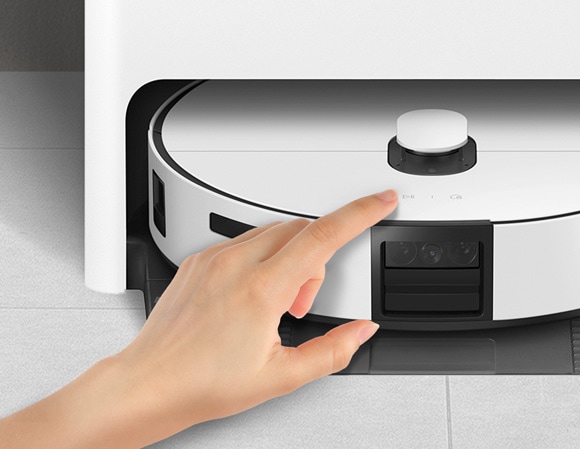
To cancel the Mode, start cleaning or press Start/Stop ⏯ for 7 seconds.
When the JetBot is in the Energy-Saving Sleep Mode, the power is turned off after charging is complete which means the Wi-Fi reception is not enabled, so the Jet Bot cannot be controlled with the mobile app. You'll have to wake it up to re-enable this.
For further assistance, please contact our Chat Support team. To find your Samsung product's User Manual, head to Manuals & Downloads.
Thank you for your feedback!
Please answer all questions.
Contact Info
Contact us
WhatsApp
![]()
![]()

