How to Fix LE or LC Error Codes on Your Dishwasher
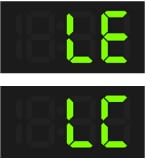
How to Fix LE or LC Error Codes on Samsung Dishwashers
If your Samsung dishwasher displays an LE or LC error code, it indicates moisture was detected where it shouldn't be, even if no visible leak is present. This guide explains how to troubleshoot and resolve these error codes safely and effectively.
1. What Do LE and LC Error Codes Mean?
The LE (Leak) and LC (Leakage) error codes signal that your Samsung dishwasher's moisture sensor has detected water in an unexpected area. These codes can appear even if there's no visible leak, often due to minor moisture buildup or misaligned components.
2. Why Is My Samsung Dishwasher Showing LE or LC Error Codes?
- Visible Leakage: Water escaping from hoses, seals, or internal components.
- Improper Leveling: Dishwasher not aligned properly, causing water pooling.
- Loose or Damaged Seals: Gaps in the door or tub seal allowing water to escape.
- - Clogged Nozzles: Food debris redirecting water flow toward the door seal.
- - Over-Tightened Cabinet Screws: Stretching the dishwasher frame and creating gaps.
- - Excess Detergent Residue: Moisture from detergent triggering the sensor.
3. How to Troubleshoot LE or LC Error Codes
- Turn Off Power: For safety, disconnect the dishwasher from the power source or turn off the circuit breaker.
- Inspect Hoses: Check the water supply and drain hoses for leaks, kinks, or loose connections. Look for moisture along their entire length.
- Check Leveling: Ensure the dishwasher is level front-to-back and side-to-side. Adjust the leveling legs if necessary.
- Examine the Door Seal: Inspect the rubber gasket for misalignment or debris. Clean it with a damp cloth and mild soap if needed.
- Clean Nozzles: Remove food particles from spray arms and nozzles to prevent uneven water distribution.
- Verify Cabinet Screw Alignment: Measure the gap between the dishwasher and cabinet. Loosen screws if the gap exceeds 22 inches.
- Test for Residual Moisture: Wipe down the sensor area under the dishwasher and allow it to dry completely.
- Reduce Detergent Usage: Avoid overfilling the detergent dispenser and ensure detergent is placed correctly.
4. Additional Things to Check
- Recent Movement: If the dishwasher was recently moved, water may have splashed near the sensor. Allow it to dry or wipe it clean.
- Water Supply Valve: Ensure the valve is fully open and functioning properly.
- Drain Path: Check for clogs in the drain hose or filter that could cause water backup.
5. Supported Samsung Dishwasher Models
These troubleshooting steps apply to most Samsung dishwasher models, including the DW80K, DW50R, and DW80N series. Always refer to your model's user manual for specific guidance.
6. When to Contact Samsung Support
If the LE or LC error persists after following these steps, the issue may require professional repair. Contact Samsung Support for assistance or schedule a service visit.
Related Samsung Support Topics
Thank you for your feedback!
Please answer all questions.