How to Check Your Energy Score with the Galaxy Ring

How to Check Energy Score with the Galaxy Ring
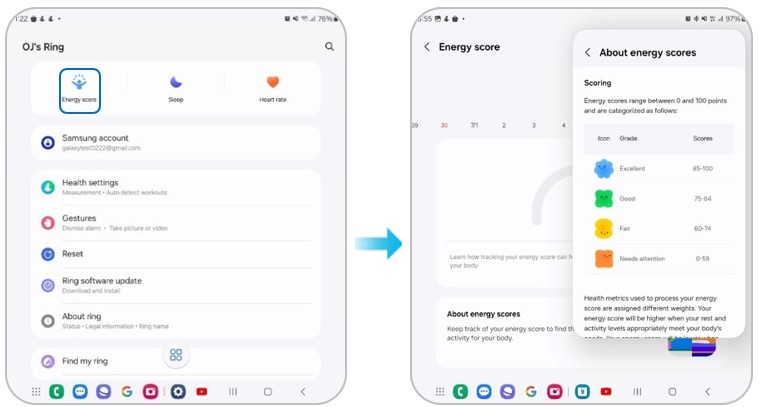
Your Galaxy Ring calculates an energy score by analyzing your sleep patterns, daily activities, and heart rate during sleep. This score helps you understand your body's energy balance and offers actionable tips for improving rest and activity levels.
1. How to View Your Energy Score
- Open the Samsung Health app on your compatible smartphone.
- Ensure your Galaxy Ring is connected via Bluetooth.
- Navigate to the "Sleep" section to view detailed sleep data.
- Scroll down to find the "Energy Score" metric, which is displayed alongside your sleep summary.
- Tap the score for a breakdown of contributing factors such as deep sleep, activity level, and heart rate variability.
2. What Does the Energy Score Mean?
Your energy score reflects your body's recovery and readiness for the day ahead. It is calculated using:
- Sleep quality, including deep sleep and REM cycles
- Daily activity levels, such as steps and active minutes
- Heart rate variability (HRV) during sleep, indicating stress and recovery levels
3. Supported Samsung Galaxy Devices
The Galaxy Ring is compatible with:
- Galaxy S24, S25, and S26 series smartphones
- Galaxy Z Fold and Galaxy Z Flip series devices
- Galaxy A series smartphones running Android 13 or later
4. Why Is the Energy Score Important?
The energy score provides a holistic view of your health by combining sleep, activity, and physiological data. It helps you:
- Identify patterns that affect your energy levels
- Adjust daily habits for better recovery and performance
- Track progress over time with personalized recommendations
5. Additional Things to Check
If your energy score seems inaccurate or inconsistent, ensure:
- Your Galaxy Ring is fully charged and properly worn during sleep.
- The Samsung Health app is updated to the latest version.
- Your device has sufficient storage space for health data synchronization.
- Bluetooth connectivity between your phone and ring remains stable.
Related Samsung Support Topics
Thank you for your feedback!
Please answer all questions.